Container Style Queries for Sharing Internal State
Problem Setup #
Container Queries are "Baseline Newly Available" according to MDN, which means it's time to start really looking at adopting them in places where it's ok to drop older browser support.
While doing research, I discovered a new feature called Container Style Queries - emphasis on style. I had probably heard about this before, but blanked it out because I didn't realize it's a bit different than just bare Container Queries! (My fault for speed reading)
In short, it allows you to conditionally apply CSS styling based on the state of a CSS Custom Property (aka CSS Variable). A simple example:
@container style(--color: darkblue) {
	/* only when --color is "darkblue" will this styling apply */
	.my-content {
		color: var(--color);
		background-color: white;
	}
}
And so, while working on Custom Elements and Container Queries, I realized that Container Style Queries could be a cool solution to exposing the internal state of a Custom Element to its children — all through the power of CSS!
An Example #
Maybe you have a layout Custom Element called "Page", and it's used like the following:
<my-page>
	<div slot="main">main content here</div>
	<div slot="side">sidebar content here</div>
</my-page>
As for how its laid out: on large screens, you like the pattern of two columns of content; a main content, and a sidebar of supplementary content.
On mobile, however, you don't have that screen real-estate for side-by-side, so you wrap the sidebar down to below the main content.
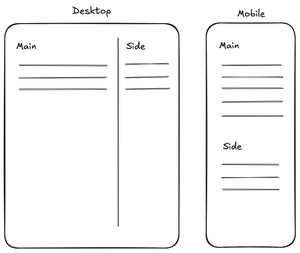
Now, what if you want the flexibility of changing when that switch happens between "desktop" and "mobile", but still provide a developer using your Custom Element a way to change their styling based on which layout variation your Page component is in? In other words, we don't want the developer to have to copy your Media or Container query breakpoints, because you reserve the right to change them at any time.
Solution: Container Style Queries #
Container Style Queries seem like an elegant solution to solve this problem. Let's say that your Page component changes the value of a CSS Custom Property / Variable called --my-page-layout-variant from desktop to mobile when it changes its configuration.
Here's a CodePen example which I'll explain, and also be aware that this (as of the time of writing) only works in Chrome; see the Browser Notes section below.
Consumers of your component would be able to use Container Style Queries to apply styles based on which layout variant the Page component is in, while YOU still get to keep the actual breakpoints hidden and internal!
Here's a silly example of what that would look like for a consumer of your Page component - maybe a consumer of your component wants to add a right border on desktop and a bottom border on mobile:
<my-page>
	<div slot="main" class="main">main content here</div>
	<div slot="side">sidebar content here</div>
</my-page>

<style>
	/* on mobile, these should stack so the border is on bottom */
	.main {
		padding-bottom: 10px;
		border-bottom: 1px solid blue;
	}

	/* on desktop, these are side-by-side so the border is on the right */
	@container style(--my-page-layout-variant: desktop) {
		.main {
			border-right: 1px solid blue;
			border-bottom: unset;
			padding-bottom: unset;
		}
	}
</style>
Browser Notes #
Container Style Queries are still a relatively new feature, so this is more of a thought experiment about how things could work in the future. Here's the current status:
- Chrome/Edge: works
- Safari: supports Container Style Queries but has a bug that prevents this specific example from working
- Firefox: does not yet support Container Style Queries
Conclusion #
While the example above is silly, I hope it demonstrates the capabilities of Container Style Queries exposing a component's internal state to children, and how that could be useful.
You, the creator of the Custom Element, get to keep your query conditions private while exposing the rendered variant to the consumer of your component. Tada!
Reach out to me on social media if you have thoughts or questions.
- Previous: Pseudo Elements & Classes
- Next: Fixing Container Queries in WebKit